

You have the option to Merge or Append in Power BI, which do you choose?
You’re working on a Power BI report, and you are looking to combine data from two different sources into one table. There is the option to Merge the data or Append the data. Which do you choose?
The answer depends on whether you are looking to:
- add more information to existing records— in which case more columns will be added to attach this additional information to each row, or
- add records that currently do not exist in the table — in which case more rows will be created.
This is the key distinction between Merge and Append in Power BI.

When to use Merge
If you would like to add additional information to the records in the table, use Merge.
Merge adds columns.
For example, here I have a table of employees and a separate table that tracks each employee’s working from home status. I am looking to combine the data into one table that shows the working arrangement alongside the employee’s name.
IMAGES TO BE INSERT - SEE MEDIUM
That’s when Merge is used.
Merge is appropriate because additional information is being added about the person. I am looking to read across the row to find the employee’s work from home status.

A point to note — Merge can only happen in Power Query if there is a common column between the tables. In at least one table, this column should contain unique values to act as a primary key (or part of a composite key). Here ‘EmployeeID’ is the primary key. Without this common column, the data can’t be merged as Power Query has no way to match the records between the tables.
In summary, use Merge if you would like to add more information to a table, and expect additional columns. Merge expands the table horizontally.

When to use Append
If you are looking to add new records to the table, use Append.
Append adds rows.
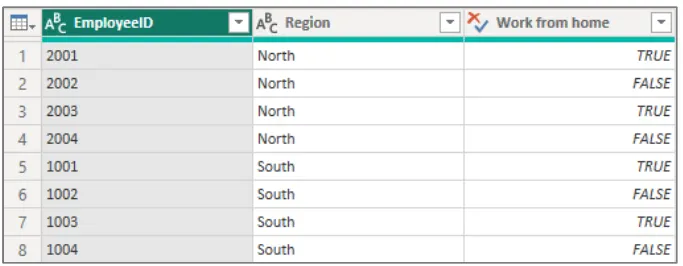
For example, here I have two separate employee tables — one for the North Region, the other for the South Region. Both tables have the same structure, same columns, but contain different records. I would like a single table that contains all employee records.
ADD IMAGE SEE MEDIUM ARTICLE
This time I am not adding information to existing records. Instead, I am adding the South Region data so that if follows on from the North Region data as I read down the table.
That’s when Append is used.
Using Append in Power Query places the records from one table underneath the records of the other, increasing the total row count
A point to be aware of — for Append to work cleanly in Power Query, both tables should have:
- the same number of columns,
- matching column names,
- matching column order, and
- matching data types.
If they don’t match, Power Query may create additional columns.
A successful Append should only increase the number of rows, not increase the number of columns.
In summary, use Append if you are expecting to see additional rows in the combined table as a result of adding records from one table onto the end of the other. Append expands a table vertically.
So, what is the difference between Merge and Append?
The difference between Merge and Append in Power BI is that Merge combines tables by adding columns (expands horizontally), while Append combines the tables by adding rows (expands vertically).
Avoid confusion — ask this question
A common points of confusion when combining data in Power BI is knowing when to ‘Merge’ and when to ‘Append.’
Before you choose, ask:
“Am I adding additional information to an existing record, or am I adding more records to a table?”
Keep it simple. Remember:
- Merge adds Columns
- Append adds Rows